Instagram, written and planned in your voice.
Buzz writes the caption from your Hive, Buzzmark checks the picture Instagram needs, and the post goes to your feed or your story at one of your best times.

Northlight Studio
@northlightstudio
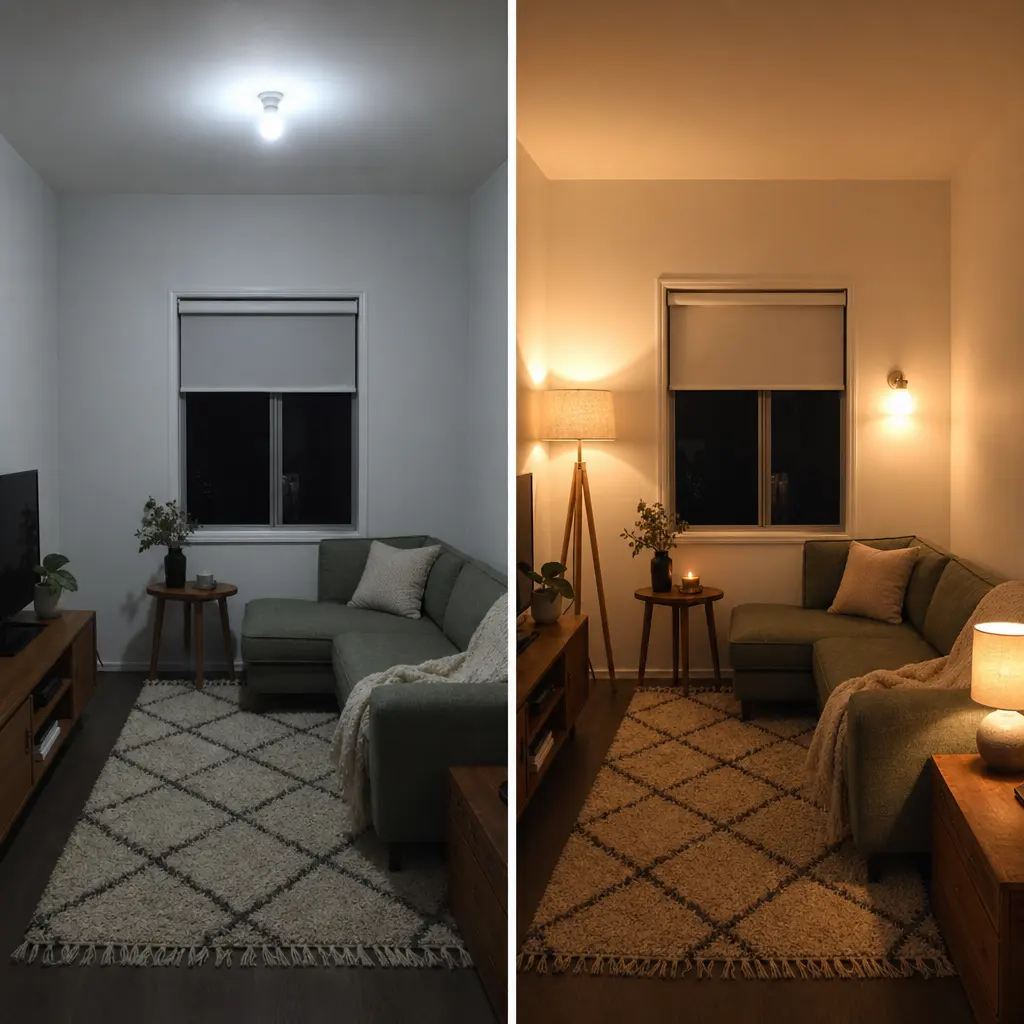
Before and after in a north-facing living room. Same sofa, same rug. The walls went from cool grey to a warm white, and 3 lamps at different heights replaced the one in the ceiling. All of it cost less than a new sofa.
Best time
A sample post for a made-up design studio.
What Buzzmark does on Instagram
The picture is checked while you write
Instagram refuses a post with no picture, and takes JPG or PNG up to 8 MB. The composer marks a missing or wrong file before you schedule, so nothing fails at posting time.
Feed post or story
Choose per Buzz. A feed post carries up to 10 pictures, or one video on its own.
Tags that reach the right account
Type an @handle and Buzzmark confirms it as a tag, so the account you name gets the mention.
A caption of its own
Start from the same Buzz as LinkedIn and give Instagram a shorter caption. Editing it here leaves every other platform as it was.
Reach, saves and the rest
Impressions, reach, views, likes, comments, shares and saves for every post, and your best times worked out from them.
Comments without opening the app
Comments on your Instagram posts land in Reach, where you can reply, like, hide or delete them.
What Instagram takes
Read from the same rules the composer checks every post against, so this list and the product never disagree.
- Length
- Up to 2,200 characters a post
- Post types
- Feed post or story
- Carousel pages
- 4:5 (1080 x 1350)
- Pictures
- Up to 10, JPG or PNG, 8 MB each
- Every post
- Needs a picture or a video
- Video
- One per post, MP4 or MOV, up to 300 MB
- Threads
- A thread is joined into one post
- @mentions
- A typed @handle tags the account
- Measured
- Impressions, reach, views, likes, comments, shares and saves
- After it goes out
- Recycle
From your website to your feed
- 1
Paste your website
The Hive reads it and sets up your voice, colours and products. You fix anything it got wrong.
- 2
Connect the account
Sign in on the platform from your brand's settings. Buzzmark never sees your password.
- 3
Plan the week
Buzz writes drafts in your voice. You edit them and drop them into your best times.